Your neighbors in Downriver

Tech help from people who live here.

Computer repair, custom PCs, networks, websites and apps. Plain English, honest prices, and we tell you what you actually need, nothing more.

734-203-0005
NEWTry our AI helperDescribe your tech problem, get a head start in seconds.

Mon-Fri after 3:30pm · Sat-Sun 8am-6pm · Texts welcome

Live repair trackerIn progress

Laptop: slow boot, loud fan

Ticket #1042 · Dave is on it (sample)

Received
Diagnosing
Repairing
Ready
Dave · todayDrive is failing. I'll clone your files first, swap in an SSD and have it back tomorrow.
You · todayPerfect, thank you!
Virus removedScan clean · data safe
Wi-Fi dead zones fixedMesh installed · 3 rooms
AI problem triageDescribe it, get a head start
Remote helpFixed from your couch
100% local, Downriver MI
Evening & weekend appointments
Honest diagnostics, no upsells
Call, text or email
What we do

Full-spectrum tech solutions.

From a cracked laptop to a custom business app, one number to call.

Computer Diagnostics

Comprehensive hardware and software analysis. We find root causes, not just symptoms. Includes a full system health report.

Computer Repair

Virus removal, hardware replacement, OS reinstalls, data recovery. Desktops and laptops, PC and Mac.

Custom PC Builds

Gaming, editing or workstation: we spec, source and assemble a machine built for how you use it.

Network Troubleshooting

Router config, mesh systems, VPN, firewall, dead-zone elimination for home and business.

Website Design

Professional, fast, SEO-ready sites. E-commerce, portfolios, business sites, responsive by default.

App Development

Custom web and mobile apps, from simple tools to full business systems.

Business Workflow Optimization

We map how your team uses technology, then automate the friction away.

Security & Backup

Backups, antivirus deployment and security audits for individuals and businesses.

Cloud Setup & Migration

Google Workspace, Microsoft 365 and custom cloud environments, migrated cleanly.

New · AI helper

Describe the problem. Get a head start.

Type what's going wrong in plain English. Our AI helper suggests the likely cause, how urgent it is and which service fits, then pre-fills your request so we can hit the ground running.

  • Free and instant. No account needed to try it.
  • A human always follows up. Dave reviews every request.
  • Private. Only what you type is used, and every answer is labeled as an AI suggestion.
Example AI suggestion
"My laptop takes 10 minutes to start and the fan is always loud. It's about 5 years old."
Likely causeAging hard drive or startup bloat, possibly dust
UrgencyMedium
Suggested serviceComputer Diagnostics
Try nowBack up your important files
How it works

Four steps. Zero runaround.

01

Contact us

Call, text or send the online form.

02

Diagnosis

We assess it and lay out your options.

03

Solution

We fix it the right way, no upsells.

04

Support

Ongoing help to keep you running.

Remote help

Fix it from your couch.

Pick whatever is easiest for you. We'll walk you through it on the phone.

Windows Quick Assist

Built into Windows 10 and 11. Press Win+Ctrl+Q, read us the 6-digit code we give you, done. Nothing to download.

Step-by-step guide

Microsoft Teams

We send you a one-click meeting link. Share your screen and, if you like, give us control. Works on Windows, Mac and your phone.

Call to get a link

RustDesk

A free, open-source remote desktop tool. Download it, read us your ID, and approve the connection. All access ends when you close it.

Set up RustDesk
Custom PC builder

Build your dream machine.

Pick a starting point or configure every part, then request a quote. We source, assemble and test it for you.

Everyday

Office, browsing, streaming. Quiet, reliable and upgradeable.

Request a quote

Gaming & creator

High-refresh gaming, video editing and streaming with a modern GPU.

Request a quote

Workstation

CAD, rendering, development and heavy multitasking.

Request a quote
Learn & play

Quick fixes you can try yourself.

DIY fixes for common problems, plus free games that teach you how computers think.

DIY quick fixes

Slow computer, dropping Wi-Fi, blue screens, ISP hidden fees and more.

Free games

Josh in the Fast Lane, Tech Racer, tech trivia, binary decoder and more.

What we've built

We don't just fix tech. We make it.

A ticketing system, games, a family planner, business software and more, all designed, built and run in-house.

Live

Customer Portal & Ticketing

Passwordless portal, tickets, appointments and invoices with online payment.

Live game

Josh in the Fast Lane

A life-sim board game: solo vs AI, pass-and-play or online for four.

Private beta

Relatively Organized

A private family planner with live sync. Invite only.

Also from Carvey Technologies

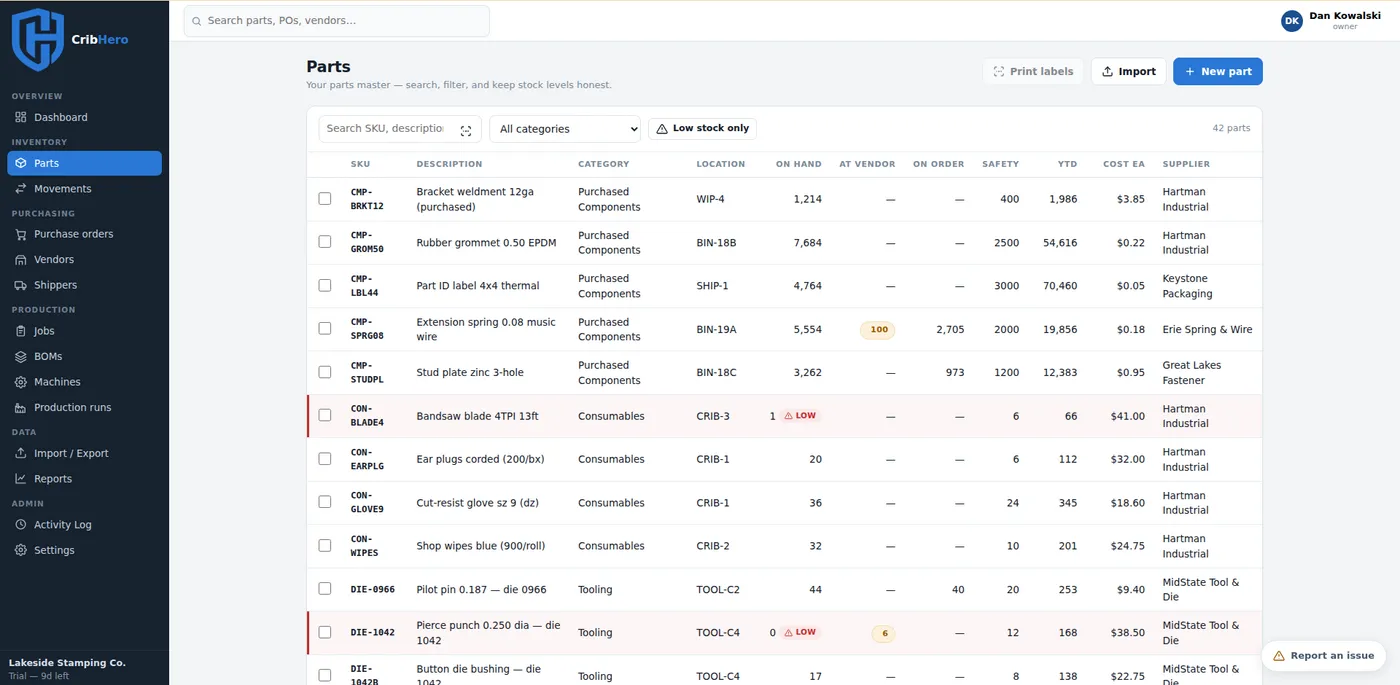
Software for your shop: CribHero.

One of the products we've built: subscription inventory software for small manufacturers. Start from the spreadsheet you already have.

  • Parts and purchase orders with low-stock alerts
  • BOMs, job kits and barcode scanning
  • Cost-per-part and job-cost reporting
FOUNDING50: 50% off, forever, for the first 25 shops
cribhero.carveytechnologies.com
CribHero parts list screenshot
Let's get you sorted

Ready when you are.

Call, text, or send a request. Tell us the device, the issue and how urgent it is.

734-203-0005
Serving the Downriver Area

OUR SERVICES

Computer Diagnostics

Comprehensive hardware and software analysis. We identify root causes — not just symptoms. Includes full system health report. Learn more →

Computer Repair

Virus removal, hardware replacement, OS reinstallation, data recovery. We work on desktops, laptops — PC and Mac. Learn more →

Custom PC Builds

Tell us what you need and we'll spec, source, and assemble a machine built for your use case — gaming, editing, workstation. Learn more →

Network Troubleshooting

Home and business networking. Router config, mesh systems, VPN setup, firewall configuration, dead zone elimination. Learn more →

Website Design

Professional websites with modern frameworks. E-commerce, portfolios, business sites — all responsive, fast, and SEO-ready. Learn more →

App Development

Custom web apps and mobile applications. From simple tools to complex business systems — we build software that solves real problems. Learn more →

Business Workflow Optimization

We analyze how your business uses technology and implement smarter systems to reduce friction, automate tasks, and save time. Learn more →

Security & Backup

Enterprise-grade backup solutions, antivirus deployment, and security audits for individuals and businesses. Learn more →

Cloud Setup & Migration

Migrate to the cloud or optimize your existing setup. Google Workspace, Microsoft 365, and custom cloud environments. Learn more →

Serving Wyandotte, Southgate, Trenton and all of Downriver. See our service area.

  
Knowledge Hub

LEARN & PLAY

DIY quick fixes + fun computer learning games

🐢

MY COMPUTER IS SLOW

+
  1. Restart your computer — clears RAM and stops runaway processes.
  2. Open Task Manager (Ctrl+Shift+Esc) and end processes using 90%+ CPU or RAM.
  3. Disable startup programs: Task Manager → Startup tab → disable unneeded items.
  4. Run Disk Cleanup (search in Windows) and clean your C: drive.
  5. Ensure your hard drive has at least 15% free space.
  6. Install pending Windows Updates.
  7. If still slow, your drive may be failing — call us before it's too late.
📶

MY WIFI IS SLOW OR DROPPING

+
  1. Restart your router: unplug 30 seconds, plug back in, wait 2 minutes.
  2. Move closer to the router — 5GHz is fast but short range.
  3. Check how many devices are connected and streaming at once.
  4. Forget and reconnect to the network on your device.
  5. Run a speed test at fast.com to compare actual vs. paid-for speeds.
  6. Router over 5 years old? May be time to replace it — we can recommend one!
🦠

I THINK I HAVE A VIRUS

+
Signs: pop-ups, redirects, sudden slowness, programs opening on their own.
  1. Disconnect from the internet immediately.
  2. Download and run Malwarebytes Free — it's trusted and effective.
  3. Do NOT call any phone number appearing in a pop-up. These are scams — always.
  4. Change important passwords from a different device while offline.
  5. If Malwarebytes doesn't clear it, bring it to us.
🔵

BLUE SCREEN OF DEATH (BSOD)

+
  1. Photograph the error code on screen (e.g., MEMORY_MANAGEMENT).
  2. Restart — if it's a one-time event it may not recur.
  3. Run Windows Memory Diagnostic: Windows+R → mdsched.exe → restart.
  4. Check for and install Windows Updates.
  5. If you recently installed new hardware/software, try removing it.
  6. Repeated BSODs = bring it to us — usually failing RAM, hard drive, or driver conflict.
🔋

LAPTOP BATTERY DRAINING FAST

+
  1. Settings → System → Power & Battery → Battery usage to find battery-hungry apps.
  2. Lower screen brightness — the display is the #1 drain.
  3. Enable Battery Saver mode.
  4. Disable Bluetooth and location when not needed.
  5. Check Task Manager for background CPU hogs.
  6. Battery over 3 years old? Affordable replacement — we can swap it.
🔊

NO SOUND / AUDIO NOT WORKING

+
  1. Check: is volume up? Muted? Headphones plugged in redirecting audio?
  2. Right-click speaker icon → Open Sound Settings → check Output device.
  3. Right-click speaker → Troubleshoot sound problems — Windows usually auto-fixes.
  4. Update audio drivers via Device Manager.
  5. Windows+R → services.msc → find "Windows Audio" → right-click → Restart.
💾

RUNNING OUT OF STORAGE

+
  1. Settings → System → Storage → turn on Storage Sense.
  2. Uninstall unused apps: Settings → Apps, sort by size.
  3. Move photos/videos to external drive or Google Photos.
  4. Empty the Recycle Bin!
  5. Check your Downloads folder — often a hidden storage hog.
  6. Long-term: upgrade to a larger SSD — we clone your existing drive, no data lost.
💸

Internet Service Provider (ISP) Hidden Fees to look out for!

+
Equipment Rental Fee ($10–$25/mo) — ISPs charge monthly for modem/router rental. Over 2 years = up to $600.✅ Buy your own compatible modem/router — payback under 12 months.
Data Overage Charges ($10–$15 per 50GB) — Some providers cap monthly data and charge extra beyond that.✅ Ask about data caps before signing. Look for unlimited data plans or negotiate a waiver.
Installation / Activation Fees ($50–$100) — Charged for technician visits or service activation.✅ Many ISPs waive this if you ask. Always negotiate before signing.
Early Termination Fees ($100–$300) — Leaving a contract early triggers a penalty.✅ Choose month-to-month plans when possible. Confirm ETF terms in writing before signing.
Price Increases After Promo Period — That $30/mo deal often jumps to $70+ after 12–24 months.✅ Ask "What is the non-promotional rate?" Set a calendar reminder to renegotiate before promo ends.

Still stuck? Call or text 734-203-0005 — happy to walk you through it or schedule a visit.

// Flagship Games //
★ FEATURED 🏁

JOSH IN THE FAST LANE

The life-sim board game: 60 hours a week to work jobs, earn degrees, invest, and out-hustle your rivals to your life goals. Watch out for rent, robbers, and MoonCoin.

SOLO vs AI · PASS & PLAY · ONLINE UP TO 4 · WORKS ON YOUR PHONE
★ FEATURED 🏎️

TECH RACER

A neon arcade racer where knowledge is speed: dodge obstacles, hit checkpoints, and answer tech trivia for boosts. Chase the top of the leaderboard.

7 CHECKPOINTS · NITRO BOOSTS · LEADERBOARD · MOBILE CONTROLS
// Quick Brain Games //
🧠

TECH TRIVIA QUIZ

Test your computer knowledge with 10 challenging questions.

01

BINARY DECODER

Convert binary to decimal. Learn how computers think in 1s and 0s!

⌨️

CODE TYPING RACE

Type computer terms as fast as you can. Build your keyboard skills!

🃏

TECH TERM MATCH

Match computer terms with their definitions. Learn while you play!

Configure Your Dream Machine

BUILD YOUR OWN PC

Choose a pre-built tier or configure your own — then request a quote and we'll build it for you.

Pre-Built Packages

SELECT A TIER

— OR BUILD YOUR OWN BELOW —
1

MOTHERBOARD

2

PROCESSOR (CPU)

← Select a motherboard first
3

MEMORY (RAM)

← Select a CPU first
4

GRAPHICS CARD (GPU)

5

STORAGE (SSD / NVMe)

6

CPU COOLING

7

CASE

⚡ BUILD SUMMARY

Start selecting components...
PRICINGRequest a quote
Labor & assembly quoted separately
Who We Are

ABOUT CARVEY TECHNOLOGIES

📍 PROUDLY SERVING THE DOWNRIVER AREA

Carvey Technologies LLC is your local technology partner — providing real solutions, honest assessments, and dependable service to individuals and businesses throughout the Downriver Michigan community. We're not a big box store. We're your neighbor, and we treat your technology like it's our own.

100%LOCAL & DOWNRIVER
∞COMMITMENT TO YOU
9+CORE SERVICES
1:1ONE TECH, START TO FINISH

Our Promise

Transparent pricing, honest diagnostics, no unnecessary upsells. We tell you what you actually need — nothing more.

Personal Service

One tech handles your job from start to finish. You always know who is working on it, and you talk directly to the person doing the work.

Local Focus

We live and work in the Downriver area. Supporting local means personal service from someone who actually cares.

Reach Out

CONTACT US

Serving the Downriver Area — call, text, or fill out the form below.

📞 Call or Text

734-203-0005

📍 Service Area

Serving the Downriver Michigan Area

👍 Facebook

Like us on Facebook

🕐 Hours

Mon-Fri: After 3:30pm
Sat-Sun: 8 AM - 6 PM

💡 Tip: Let us know your device type, the issue, and how urgent it is — helps us get you the fastest solution.

SEND A SERVICE REQUEST

🖥️ REQUEST A BUILD QUOTE

We'll review your config and provide a full quote including labor.